
This year first, second, and third graders have worked so hard at improving their literacy and math skills. They've worked on their skills in whole group lessons using our core curriculums (EL for literacy, UFLI for spelling skills, and Illustrative Math for math) and in small groups.
Throughout the year students also use a handful of websites to review skills, practice reading, and record reading time. Some students (and their adults) have asked how to access these sites at home (and throughout the summer). While we all advocate for less screentime, we do live in the world and know there can be a time and place for it

Lexia
"a fun, computer-based program that helps students improve their literacy skills. The activities in Core5 support and build on your child’s classroom curriculum and focus on developing reading skills in six areas: phonological awareness, phonics, structural analysis, fluency, vocabulary, and comprehension.

Flyleaf Books
"E-Book Library is a resource designed for teachers and families to share with their young learners. This library provides digital access to all 89 of Flyleaf’s high-quality decodable texts so they can be read and enjoyed both inside and outside of the classroom."

Math Fact Lab
"a teacher-created online program that builds math fact fluency and number sense through visual models and reasoning strategies, rather than rote memorization. It helps students permanently internalize concepts for addition, subtraction, multiplication, and division, providing a strong foundation for higher-level math."

Beanstack
"Build healthy reading habits with us using Beanstack! Students and families can easily log their child's reading online, and also track sessions with a built-in timer, and scan book barcodes from their mobile device."
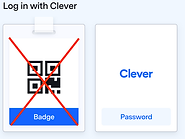
The easiest way to access all these sites is through Clever, our single sign-on system. The first time you will need to log into Clever. (Pictorial on left.)
-
Choose the Clever Login option (not Badge).
-
To Find your school, type Vernon and choose the one in the Windham Southeast Supervisory Union.
-
Then it will ask you to log in with your Google account with the username and password we sent home.


Links to all the sites can be found on their main Clever page or Mrs. Grobe's Summer Learning Page.


You can also contact Dawn Grobe (AST/tech support) at dgrobe@wsesu.org.